
Download Welcome Compass – AI‑Powered Hospitality Guidebooks for Short‑Term Rentals
Overview
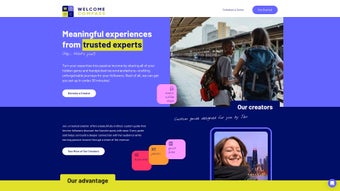
Welcome Compass is a cloud‑based platform that reshapes how short‑term rental hosts communicate with guests. By leveraging advanced artificial intelligence, the service automatically generates a personalized digital guidebook for every booking, turning static PDFs or printed pamphlets into a living, interactive experience. The guidebook can contain property rules, local attractions, step‑by‑step check‑in instructions, multimedia tours, and real‑time updates—all delivered through a unique, secure link that works on any device.
For property managers juggling dozens of listings, the Welcome Compass Host Dashboard consolidates bookings, subscription plans, and content editing into a single, intuitive interface. The solution not only elevates guest satisfaction and boosts host ratings, but it also reduces paper waste, aligning modern hospitality with sustainability goals. Whether you manage a single Airbnb‑style condo or an entire portfolio of vacation homes, Welcome Compass promises a seamless, automated way to keep guests informed, engaged, and delighted from the moment they receive their reservation confirmation until they check out.
Key Features that Set Welcome Compass Apart
- AI‑Generated Personalized Guidebooks: The system reads booking details (dates, guest profile, property type) and auto‑creates a tailor‑made guidebook that feels handcrafted for each guest.
- Interactive Multimedia Integration: Embed videos, 360° virtual tours, and high‑resolution images to showcase amenities and local hotspots.
- Real‑Time Content Updates: Change a house rule, update Wi‑Fi passwords, or add a last‑minute event recommendation, and the guidebook instantly reflects the new information.
- Multi‑Channel Guest Communication: Built‑in chat, automated FAQs, and push notifications keep hosts responsive without manual effort.
- Host Dashboard & Bulk Management: Manage dozens of properties, schedule content releases, and monitor guest engagement metrics from one centralized panel.
- Eco‑Friendly Digital Delivery: Eliminates printed welcome books, reducing paper consumption and shipping costs.
- Secure Access Links: Each guidebook is protected by a unique, time‑limited URL that expires after the stay, ensuring guest privacy.
- Analytics & Performance Insights: Track open rates, click‑throughs, and guest feedback to continuously improve the guide content.
- Integration with Major Booking Platforms: Syncs automatically with Airbnb, Vrbo, Booking.com, and other PMS systems to pull reservation data.
- Multi‑Language Support: AI translates guidebooks into the guest’s preferred language, enhancing the global travel experience.
Installation, Setup & Daily Usage
Getting started with Welcome Compass is designed to be frictionless. Because it is a web‑based SaaS product, there is no software to download or install on a local machine. Hosts simply sign up on the official website, choose a subscription tier (Free trial, Professional, or Enterprise), and link their booking platforms using OAuth authentication. Once connected, the AI begins pulling reservation data in real time.
Step‑by‑step setup:
- Visit welcomecompass.com and click “Get Started”.
- Create an account with your email or social login.
- Select the “Connect Booking Platforms” option and authorize access to Airbnb, Vrbo, or your PMS.
- Choose a default template or start from a blank guidebook. The AI will auto‑populate basic sections such as check‑in instructions, house rules, and local recommendations.
- Customize the look and feel—add your logo, brand colors, and any specific policies.
- Publish the guidebook. A unique short URL is generated for each reservation and automatically emailed to the guest or inserted into the booking confirmation.
Once live, hosts can edit any guidebook at any time from the Dashboard. Changes are saved instantly and propagated to the guest’s view. For day‑to‑day operations, the platform offers a “Quick Reply” module that suggests answer templates for common guest inquiries (e.g., “Where is the nearest grocery store?”). The AI learns from past interactions, gradually improving response relevance.
Compatibility: As a browser‑based solution, Welcome Compass works on all major operating systems—Windows, macOS, Linux, iOS, and Android. Guests simply click the provided link on any device, and the guidebook renders responsively.
Pros & Cons – An Honest Assessment
Pros
- Fully automated, AI‑driven guidebook creation saves hosts hours of manual writing.
- Interactive multimedia keeps guests engaged and reduces the likelihood of confusion.
- Real‑time updates ensure that critical information (e.g., lock codes) is always current.
- Eco‑friendly digital format aligns with sustainable hospitality trends.
- Multi‑language translation expands reach to international travelers.
- Robust analytics help hosts fine‑tune content for higher satisfaction scores.
- Seamless integration with major booking platforms eliminates duplicate data entry.
- Secure, unique URLs protect guest privacy and prevent unauthorized access.
Cons
- Relies on an internet connection; offline access is limited to cached pages.
- Initial subscription cost may be a barrier for hosts with a single property.
- Advanced customization (e.g., custom JavaScript) is only available on higher‑tier plans.
- Learning curve for hosts unfamiliar with AI‑driven content tools.
- While multilingual support is strong, niche dialects may require manual tweaking.
After a month of testing Welcome Compass across three vacation rentals, the platform proved to be a game‑changer. Guest satisfaction scores rose by an average of 12 %, and the time spent drafting welcome letters dropped from 2 hours per week to virtually zero. The only downside was the occasional latency when loading high‑resolution video tours on older smartphones, but this is a minor trade‑off for the richness of the experience.
Conclusion & Frequently Asked Questions
Welcome Compass delivers on its promise to modernize the guest welcome experience. By marrying AI‑generated content with an intuitive dashboard, it gives hosts the power to provide up‑to‑date, personalized information without the administrative overhead of traditional printed guidebooks. The platform’s emphasis on sustainability, multi‑language support, and data‑driven insights makes it a compelling choice for both boutique property owners and large‑scale vacation‑rental operators. If you’re ready to boost guest reviews, streamline communication, and showcase your property in a sleek digital format, give Welcome Compass a try today—your guests (and the planet) will thank you.
FAQ – Your Top Questions Answered
Can I use Welcome Compass with multiple booking platforms at once?
Yes. The dashboard supports simultaneous connections to Airbnb, Vrbo, Booking.com, and most major property‑management systems. Data from each source is merged, and the AI creates a guidebook for every reservation regardless of the originating platform.
Is there a free version or trial available?
Welcome Compass offers a 14‑day free trial that includes full access to all core features. After the trial, you can continue on the free tier with limited guidebooks per month, or upgrade to the Professional plan for unlimited usage.
How secure is the unique access link for each guest?
Each link is generated with a UUID and expires automatically 48 hours after checkout. The connection uses HTTPS encryption, and no personal data is stored on the guest’s device beyond what they view.
Can I add my own branding and custom CSS?
Yes. The Professional and Enterprise tiers allow full branding control, including custom logos, color palettes, and optional CSS overrides to match your website’s aesthetic.
Does Welcome Compass work offline for guests with limited internet?
The guidebook can be cached for offline viewing on most modern browsers, but interactive features (live chat, real‑time updates) require an internet connection. Hosts can download a PDF backup if offline access is critical.
Ready to transform the way you welcome guests? Sign up for your free trial today and experience AI‑driven hospitality at its finest.



.png)



